Best Cleaning Apps for Maximizing Android Performance


You need to know if these junk files are not deleted on Android smartphones, it will cause a decrease in the performance of the phone. Mobile so slow and memory was also crowded with junk files. Therefore, you are highly recommended to install cleaner applications for performance phone performance remained stable. Wash Cleaner or Android application provides many benefits on your favorite smartphone, such as the performance of the phone is always good, fast internet access and much more.


Best Cleaner Application of the most widely used on Android Smartphones:

  1. Clean Master (Boost and AppLock)
    This app has been trusted by more than 50 million users and continues increasing in number, Clean Master is a memory optimizer application is very powerful and junk file cleaners number 1 can increase the speed of your Android smartphone. Optimize the speed of applications and games become easier to use Clean Master.


  2. DU Speed Booster & Cleaner
    Trusted by 230 million users, DU Speed Booster is the only all-in-one speed booster, trash cleaner and antivirus app that optimizes your background apps, memory space, junk(cache) files and battery power. While keeping your device safe from virus and trojan, that can secure your private data with the AppLock function.

  3. Power Clean - Optimize Cleaner
  4. Power Clean is a small, fast, and totally free Android device cleaner and booster featuring a junk cleaner, memory booster, device optimizer, app manager. With this app, you can free up storage, boost RAM, remove or disable unnecessary Apps, lock apps, boost games and get your device running again like when it was new. 
  5. Is your Android device performance slowing down? Do unwanted Apps and redundant files occupy your mobile device storage space? Power Clean, the fast and powerful cleaner that helps you to free up storage, clean up memory, stop autostart Apps, remove or disable unnecessary Apps, know your device, optimize and speed up it. Just one click, you’ll be the Optimize Master of Android.


  6. CCleaner
    Keep your Android clean, safe and fast using CCleaner! Piriform, the makers of the world’s most popular PC and Mac cleaning software bring you CCleaner for Android. Remove junk, reclaim space, monitor your system and browse safely. Become the Master of your own device with the ultimate cleaning app for your Android!
  7. AVG Cleaner - Android Booster & Battery Saver
    Use AVG Cleaner - Android Booster & Battery Saver to monitor, erase, clear and clean junk files, bad & similar photos and unwanted apps from your device’s internal and SD card to help boost speed and make space for the apps, music & photos you really love.
  8. Avast Cleanup & Boost
    Avast Cleanup is a highly effective cache and junk cleaner app for Android. Remove leftover files and unused apps with a simple tap, for a faster, more powerful phone.Avast Cleanup optimizes your phone's performance and boosts its speed by removing unused junk from your mobile. No freezing, no lagging, no impatient sighs – just more space for the things you really want, like your favorite photos, videos, music, apps and more.
Optimize Android Smartphone capabilities with Applications Cleaner look, so many of my best Android on the cleaning application, thank you for visiting and hopefully useful!

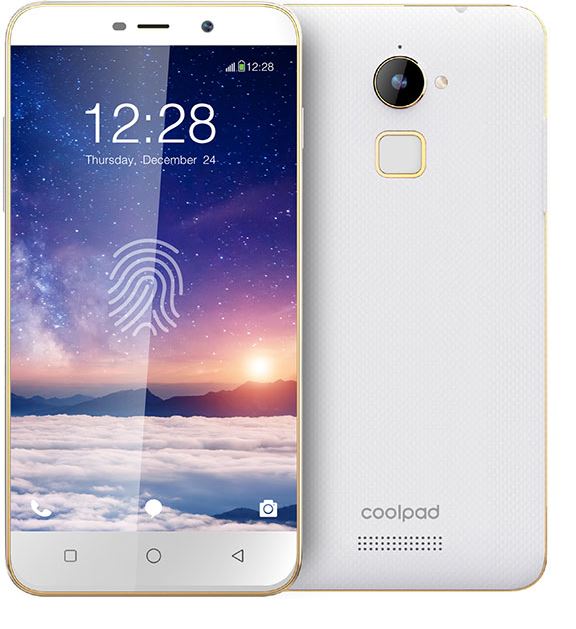
Coolpad launches limited gold edition of Coolpad Note 3 Lite

Coolpad has launched a gold limited edition of Coolpad Note 3 Lite to have fun the milestone of five lakh clients of Coolpad notice 3. This restrained edition of Coolpad notice three could be available exclusively on Amazon.in from June nine for Rs. 7499.

Coolpad Note 3 Lite was launched returned in January this 12 months. This smartphone introduced fingerprint sensor in an access-stage cellphone. Fingerprint additionally supports 360 degrees finger rotation capability.

Coolpad Note 3
Syed Tajuddin, CEO, Coolpad India stated,” From the time Coolpad be aware 3 Lite turned into released, this electricity- packed cellphone has acquired phenomenal reaction due to its power- packed capabilities. notice 3 Lite become launched solely for Indian marketplace reiterating our dedication. To mark the event of selling 5 lakh units in less than six months, we unveiled the restricted gold edition of note 3 Lite. This new variation is our way of thanking our esteemed customers for the great help.”

Coolpad notice 3 Lite features a five-inch HD show with scratch resistant glass protection. it's far powered using a 1.3GHz Quad-core 64-bit MediaTek MT6735 processor with three GB RAM and Mali-T720 GPU. It runs on Android 5.1 Lollipop.

It capabilities a thirteen-megapixels rear digital camera with LED flash and 5 megapixels front camera. It comes with fingerprint sensor at the lower back aspect of the cellphone.

Coolpad Note 3 Lite specifications


  • Dual SIM
  • 5-inch (1280 x 720 pixels) HD IPS display, Scratch-resistant Glass
  • 1.3GHz Quad-Core 64-bit MediaTek MT6735 processor
  • Mali-T720 GPU
  • 3GB RAM
  • Android 5.1 (Lollipop) with Cool UI 6.0
  • 16GB internal storage, expandable up to 32GB with microSD
  • 13-megapixels rear camera with LED Flash
  • 5-megapixels front camera
  • Fingerprint sensor
  • 4G LTE / 3G HSPA+, Wi-Fi 802.11 b/g/n, Bluetooth 4.0, GPS, USB OTG
  • 2500mAh battery
  • Dimensions: 140.8 x 70.4 x 8.9mm
  • Weight: 152g

11 Selfie Best Smartphone price from 90 $


The Smartphone has indeed become a best friend to all of us. A lot of work we can do on a smartphone. In addition to the job, certainly a smartphone also presents a feature for the pleasure of others, for example, to play games, to chat with a girlfriend, social media, photos, or other.

Most smartphone users today are choosing/buying the Smartphones because the feature based on his joy of it. Especially the camera for a selfie. Selfie now features into special consideration for someone when will buy smartphones.

Selfie Best Smartphone price from 90$
The more sophisticated a smartphone then, the more high price. And usually, the best selfie smartphone has linked to the price the expensive smartphone. But not solely because it is true, I will be describing the smartphone selfie lowest price from 1 million.

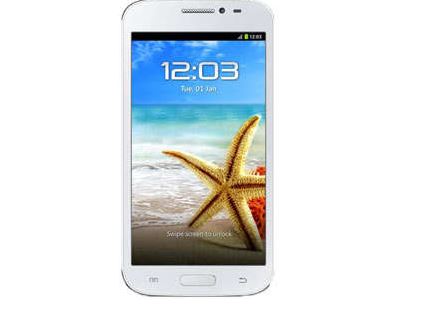
1. Vandroid S5D Advan

Vandroid S5D Advan
Regarding appearance, the smartphone Advan most shaped box. Low prices with guaranteed quality, making many Advan sold. Well for example Advan Vandroid S5D. With a somewhat different form with a smartphone other Advan selfie, this cheapest smartphone brings the front camera 5MP and 8MP rear camera.

2. ZTE Star 1

ZTE Star 1
Selfie best smartphone with a 5MP camera and other cheap namely ZTE Star 1. About ZTE in Indonesia is indeed also the vendor ZTE smartphone that offers its smartphone with super quality and at bargain prices. Moreover, the shape of this smartphone is very elegant, even up to look like a smartphone priced at tens of million. On the issue of front camera and a bargain price, ZTE Star 1 example. Temurah Selfie Smartphone also has a front camera 5MP and 8MP rear camera.

3. Accrued A66A Y Evercoss

Accrued A66A Y Evercoss
Evercoss currently already familiar to our ears. We can see the Evercoss products with the high specification but with low price in TV ads. Many people who like Evercoss because its performance. Evercoss Y A66A Accrued one of them, but this smartphone also has a good camera too, namely the front camera 5MP rear camera and 13MP.

4. Polymer Himax Octa Core

Polymer Himax Octa Core
Selfie best smartphone with a front camera 5MP and at a bargain price next came from mobile phone factory named Himax. For the layman, it may not know the manufacturer of this phone. Yes, it is a new entry to his own Himax Indonesia. Nevertheless, Himax himself did not set the price of a mobile phone with expensive in Indonesia, for example, Himax Polymer Octa Core. The Smartphone has a front camera 5MP rear camera and 13MP.

5. Xiaomi Redmi Note

Xiaomi Redmi Note

It's been no secret that Xiaomi now being much loved by the people of Indonesia. How not? With the specifications of the gods, the smartphone Xiaomi price is low. Even the 2.5 million IDR Xiaomi smartphone priced at 6 million, for example, Xiaomi Redmi Note. This Smartphone has a front camera 5MP rear camera and 13M. Its specifications would certainly make you drool!

6. Barcelona 5 Advan

Barcelona 5 Advan

Advan Barca 5 had a front camera 8MP, guys! So make selfie lovers are guaranteed satisfied And don't forget there's a rear camera 8MP. Very suitable for fans of FC Barcelona who likes selfie

7. Samsung Galaxy Grand Prime

Samsung Galaxy Grand Prime

Who would not know the Samsung? Surely everyone knows vendors on this one. Samsung indeed has many high-quality smartphone products, but the price is a little higher. But Samsung Galaxy Grand Prime presents a high specification with a lightweight price. The front camera of Samsung Galaxy Grand Prime i.e. 5MP, 8MP rear camera while IE.

8. Mi4i Xiaomi


One of the Smartphones of Xiaomi now again be it hunters smartphone is Xiaomi Mi4i. Be a successor to the flagship Xiaomi Mi4, 8MP rear camera equipped Mi4i and front camera 5MP.

9. Samsung Galaxy J5

Samsung Galaxy J5

No doubt the quality of products from Samsung. Samsung Galaxy J5 is one of the best selfie smartphones from Samsung. This smartphone is suitable for you who likes selfie relative or take pictures because it has a rear camera 13MP and front camera 5MP fed LED Flash.

10. Samsung Galaxy J3

Samsung Galaxy J3

Directly to its specifications, guys! Oh yes, the Samsung Galaxy J3 ** ** it had a front camera 5MP and 8MP rear camera.

11. Samsung Galaxy Grand Prime VE (Value Edition)

Samsung Galaxy Grand Prime VE (Value Edition)

It his name long enough for a smartphone? Samsung Galaxy Grand Prime VE had a camera back of 8MP and front camera of 5MP.
Is cool not a smartphone at the top? Of all the Smartphones that are on top, the most I like IE Xiaomi. Well, which one do you like? May be useful.

Best Antivirus Apps for Android Smartphone

Although Android has enough qualified internal security and is based on linux is not as easy as it was broken, but a lot of people who feel more secure if their smartphones have an antivirus application - for the sake of precaution. Surely this is based on many years of experience using a desktop PC.

There is nothing wrong complement your Android device with this kind of application because in addition to antivirus, the application is also equipped with other safety features such as search the phone and anti-theft. Coupled with the increasingly frequent presence Malware reports emerged that circulate freely in Google Play, then we also collect the following five applications to help provide the best security for your favorite device.


Here is The Best antivirus application on Android Smartphone:

  1.  1. Kaspersky Internet Security for Android Smartphone

    The PC version of Kaspersky is regularly showered with accolades and often voted the best internet security suite you can get. The free mobile version offers all the standard anti-malware protection you'd expect, as well as a whole host of anti-theft features. Upgrade to the premium version (US$14.95 for one year), and you get anti-phishing protection for your text messaging, cloud protection and privacy protection when you surf the web.
  2. 2. Bitdefender Antivirus Free
    Bitdefender isn't as well-known as some other antivirus companies, but its Android security app is light, powerful, fully featured and easy to use. Despite having paid version, the free version of Bit Defender was already quite capable. How it works is very simple. You install, scan devices, get rid of the threat and then sit back and wait for those who would idly try to break into your device.
  3. 3. Avast! Mobile Security & Antivirus
    Avast Antivirus security system is mostly contained in a PC or a computer, but one antivirus, it is also believed to be very powerful to be installed on your Android phone. In order for your smartphone protected from various kinds of virus and malware attacks that can damage your Android software. One of the advantages possessed by avast mobile security feature is the presence of burglar (anti-theft), GPS tracking, SMS history, alarm, automatic locking smartphones and also complete with the URL and Firewall features.
  4. 4. McAfee Mobile Security for Android
    A well-known name in PC anti-virus software, McAfee impressed us with its wide range of features, which balance functionality with ease of use. We especially liked this product's anti-theft and privacy-protection features, not to mention its intuitive interface, which is full of helpful notes and keeps complex features simple and understandable. But this product's malware-detection rate wasn't quite perfect, and at $29.99 per year for the premium version, McAfee Mobile Security costs twice as much as rival apps that offer better protection.
  5. 5. 360 Security – Antivirus Boost
    Shot by Qihoo 360 Software, 360 Security is one of the best security and antivirus applications that exist in Google Play, the fun application is free and full features. Everything you want is here, ranging from cleaning devices from threats, clean up junk, and has a privacy advisor and monitor data.

Some Reasons Causing Android Smartphone Hangs

Today's modern era, generally smartphone does have exceptional features than a regular cell phone, be it BlackBerry, Android smartphones such as Samsung Galaxy, Nokia, Sony Xperia, etc. However, all the devices still have weaknesses, especially in the resilience of hardware and software crash risk.
In the discussion, this time, we will discuss the causes of smartphones often hangs and then suddenly restart itself, including:

  1. 1. File management is not good and messy
    Managing files in your smartphone are highly recommended, such as cache and cookie are still lodged in your smartphone. Because if the junk files like that are not in the clear and well-run, it will cause your smartphone will be more severe and could lead to hang smartphone.

  2. 2. Running multiple applications simultaneously
    Run many applications simultaneously will cause the performance of the smartphone to be heavy and have to hang a huge risk. Use of existing applications to prevent smartphone interchangeably hangs and error.

  3. 3. Too many applications that are installed on the smartphone
    Too many applications android installed on PlayStore or from APKs that are not within the capacity of the device on your android phone, for example, you install 3d games in PlayStore while the game requires specification of android device that is above average, especially the GPU and RAM memory is enough well, the GPU functions to display the image, if your android device does not support GPU and RAM than average better not be imposed as it would lead to the failure of operation, locate the appropriate application to your android device.

  4. 4. The occurrence of the Software System Crash
    This can occur if you modify or add an application that resides on a system or it can occur due to other things like removing the application system, the most common thing is damage due to the modification.

  5. 5. Not having a reliable antivirus application on smartphone
    Smartphones have already approached the operating system OS computers and laptops so desperately need users to install antivirus and update it. Especially if you frequently online then it is absolutely necessary to prevent virus entry into your smartphone and can lead to hang.

  6. 6. Excessive use your Smartphone
    Surely this will not be a trivial thing, Smartphone Usage in excess can lead to overload the CPU and memory RAM if it happens android smartphone will hang and will even restart itself.

  7. 7. Memory storage is full

    Memory storage is full could lead to your smartphone hangs. The solution is to delete data that is not needed or immediately move to a computer or laptop.

    So a few things that will lead to hang on a smartphone. Therefore more careful in the use of smartphones in order not to hang. I hope the above review useful to you.

The Best FM Transmitter App For Android

android transmiter
if you are among individuals who sincerely revel in taking note of songs at any time of the day, be to your car or anywhere, then the nice aspect for you is to make use of the excellent FM transmitter app.

At gift, customers can enjoy more than ten thousand songs with the assist of those applications. those apps are virtually extraordinary and people like to pay attention to most popular and latest music added by means of those programs. Now, before we delve deep into the list of fine FM transmitter packages for Android, allow us to provide you a brief description of what FM transmitter apps are.

FM Transmitter App

In FM radio, there may be a frequency modulation transmitter that traps and approaches indicators and radio act because the alternative to the loudspeakers. This frequency modulation (FM) transmitter facilitates the apps in connecting along with your cellular tool. The paintings characteristic is similar to a Bluetooth. The simplest issue is you need a working net connection due to the fact Android frequency modulation apps provide FM transmission through the internet.

Best FM Transmitter App For You

Now, let us check out the list of best FM transmitter App for android:


one of the excellent FM transmitter packages inside the gift market. The common Bluetooth to frequency modulation in conjunction with direct in-car audio solution makes this one the best software. The UI provided by using music hyperlink is virtually sophisticated yet, it is easy to use.

The hardware of track hyperlink is managed by the unfastened android utility. once you have got downloaded the loose music hyperlink app, it is really easy to use, simply, plug, pair, play and percentage.

down load the Tunelink app from Playstore or you can additionally get it from Android market. and then plug the track hyperlink within 12V power supply of your car. allow the Bluetooth and pair as soon as to the Tunelink unit. Use FM transmitter or the direct connect option for playing your track thru car audio system.

Also, you can set up the share mode for activities through the tunneling application. The features of Tunelink include Hi-Fi speakers; direct connect, Bluetooth pairing, humbuster and fast USB charger.

Quick FM transmitter

Quick FM transmitter

This unique use utility rolls out briskly for getting the ISO3. The particular use makes ISO 1, ISO3 and ISO5. This little software is a good deal better than the general public bear in mind it to be. The pleasant a part of this app is it really works perfectly on exclusive cellular devices apart from tabs. Being well matched with distinct mobile devices, this one is my personal favorite.

This one does now not soak up any additional space and also you won’t have to buy a large number of extra hardware like different packages. we might have given it a five-superstar score, but given that it's far simplest suitable for ISO 1, 3 and 5, we're giving it four.5 stars.

Vacant FM locator

Vacant FM locator

The application does not turn your device into an FM transmitter, but it is actually meant to be used with a separate FM transmitter device. It takes up your perfect location and then it launches the site www.radio–locator.com. This website offers a list of unused frequencies that you can use.

FM transmitter helper

FM transmitter helper

This utility makes use of your gift vicinity in locating out which one may be the most beneficial r/c for being used at the side of your FM transmitter. for getting the highest satisfactory, this utility offers three stations that cause the least interference without any trial and blunders.

makes use of the FCC database and it's far the ideal one for car trips. additionally, an area issuer desires to be enabled inside the cellphone configurations.

Car home ultra

Car home ultra

This app is capable of gambling Mp3/M3U/PLS/AAC/ACP channels and shout solid/ ice cast upload channels. This app accommodates of the modern day era. It collects the present day and maximum popular audio for you. it's been voted because the maximum famous and most downloaded FM Transmitter application in the current years.

conclusion:

these are the most popular and most used FM transmitter programs for android. we are hoping you shall enjoy our collection of applications. The collections were introduced consistent with their scores and additionally the pinnacle downloads in step with Playstore.

So we assume that those are simply the nice applications for you. the use of those applications you could experience music through the net at any time of the day or night time. if you have used any of those above-referred to packages experience free to proportion your enjoy. For more thrilling matters to recognise, hold exploring our blog

Tips on buying a good quality POWERBANK


Power Banks are portable devices to charge the battery at any time, and anywhere. But many sellers in the market power of banks so that many consumers are confused to choose a good bank power products.
Some things to consider in how to choose before buying POWERBANK Right For Smartphone is as follows:

  1. 1. Note Cell POWERBANK
    Most people buy POWERBANK regardless of the type of cell from POWERBANK itself. But you should also pay attention because the cell on the power bank will affect whether or not the durable power of a power bank. Cell A great example is Japan Cell, Cell Samsung, Sanyo Cell etc.

  2. 2. Capacity POWERBANK
    Powerbanks, in general, have different capacities with the label. If the calculated Power bank which has a capacity of 5600 mAh is used to charge the battery capacity of 2100 mAh, the power of the bank will be able to fill up to 3x charger to the brim. While in general there were only capable POWERBANK fully charge up to 2x or 1x only. Quality POWERBANK usually have real power close to 100% of the label.
  3. 3. Completeness sees accessories from Power Bank
    That we need to consider is how to choose the completeness of accessories available from the power bank. The most important thing is that we can try it first to see if there are light indicators, connectors, cable A / C as well as original battery. We can try to be able to see beforehand completeness that existed before we buy power bank.
  4. 4. Observe the Product Warranty

    We suggest you choose a product that has a warranty of 1 year. and make sure the warranty is not authorized warranty counter or personal guarantee. KW many products on offer at a low price and a 1-year warranty as well but is not an official guarantee.

  5. 5. Observe POWERBANK brand.

    Choose brands POWERBANK nice and reliable on the market, here are 5 brand power bank is a nice quality in the market. Such as Vivan, hippo, Xiaomi, Sony, Advance and Samsung. Of course, the better the brand price of goods also follows.
So little information tips and tricks in choosing POWERBANK nice. Make sure you buy quality POWERBANK considering this device is needed when you are traveling a lot, camping or traveling which takes a long time on the trip.